Note
Access to this page requires authorization. You can try signing in or changing directories.
Access to this page requires authorization. You can try changing directories.
Azure Virtual WAN
This hub-spoke architecture provides an alternate solution to the hub-spoke network topology architecture and the secure hybrid network architecture.
The hub is a virtual network in Azure that serves as a central point of connectivity to your on-premises network. The spokes are virtual networks that peer with the hub and help isolate workloads. Traffic flows between the on-premises datacenters and the hub through an Azure ExpressRoute or Azure VPN Gateway connection. This approach replaces traditional hubs with Azure Virtual WAN, which is a fully managed service.
This architecture includes the benefits of standard hub-spoke network topology and introduces new benefits:
Less operational overhead by replacing existing hubs with a fully managed Virtual WAN service
Cost savings by using a managed service and removing the need for a network virtual appliance (NVA)
Improved security through centrally managed secure hubs that use Azure Firewall and Virtual WAN to minimize security risks related to misconfiguration
Separation of concerns between central IT such as security and infrastructure operations and workloads such as development operations.
Architecture
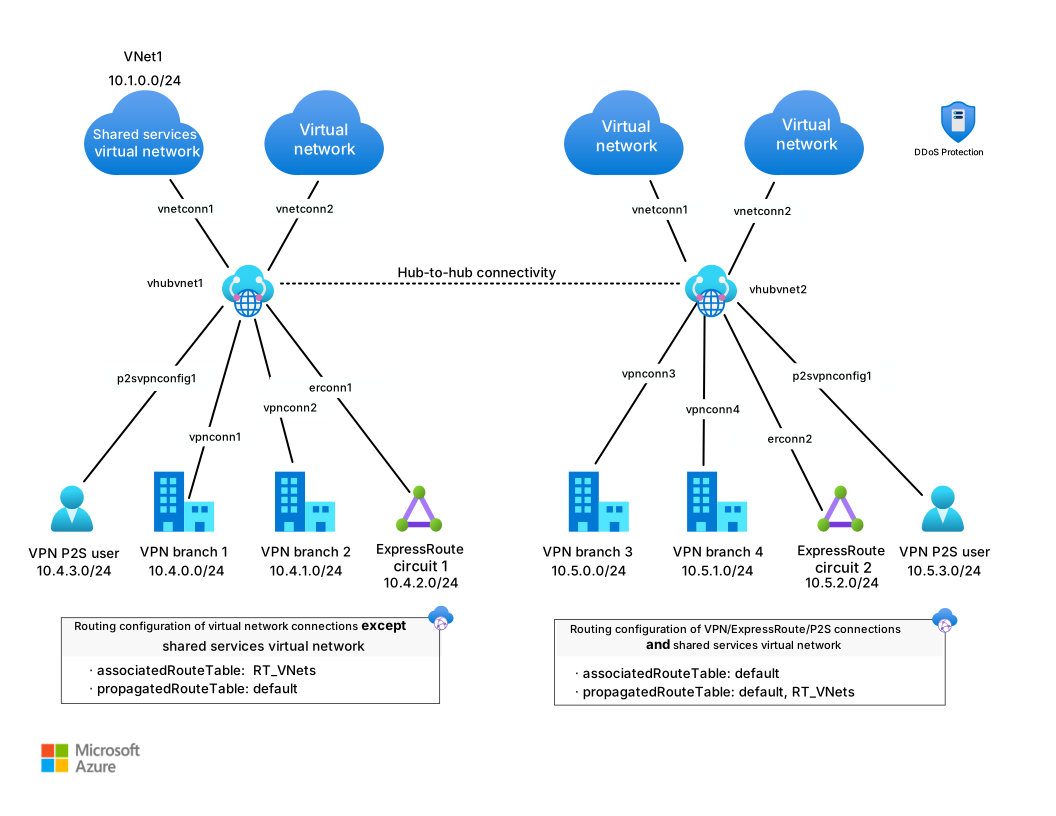
Download a Visio file of this architecture.
The architecture uses the following networking components:
On-premises network: A private local area network (LAN) that operates within an organization.
VPN device: A device or service that provides external connectivity to the on-premises network.
VPN virtual network gateway or ExpressRoute gateway: A virtual network gateway that connects the virtual network to the VPN device or ExpressRoute circuit that you use for on-premises connectivity.
Virtual WAN hub: The Virtual WAN serves as the hub in the hub-spoke topology. The hub is the central point of connectivity to your on-premises network. It hosts services for workloads in the spoke virtual networks.
Secured virtual hub: This Virtual WAN hub includes security and routing policies that Azure Firewall Manager configures. A secured virtual hub includes built-in routing, so you don't need to configure user-defined routes (UDRs).
Gateway subnet: This subnet contains the virtual network gateways.
Spoke virtual networks: One or more virtual networks that serve as spokes in the hub-spoke topology. You can use spokes to isolate workloads in their own virtual networks and manage them separately. Each workload might include multiple tiers across multiple subnets, with Azure load balancers that distribute traffic within or between those tiers.
Virtual network peering: You can use virtual network peering to provide a nontransitive, low-latency connection between virtual networks. Peered networks exchange traffic over the Azure backbone without requiring a router. In a hub-spoke network topology, use virtual network peering to connect the hub to each spoke. Virtual WAN enables transitivity among hubs, which isn't possible by using only peering.
Workflow
The following workflow describes how traffic flows through the hub-spoke Virtual WAN architecture:
Branch or user traffic originates on-premises: A user or system from a branch site or on-premises network initiates a connection. This traffic is routed through the SD-WAN or VPN device configured to connect to Virtual WAN.
Traffic enters Azure via a VPN or ExpressRoute gateway: The encrypted traffic reaches the Virtual WAN hub through a VPN or ExpressRoute gateway deployed in the region. Virtual WAN manages and optimizes routing to the appropriate destination.
The Virtual WAN hub manages routing: The hub evaluates routing policies, including custom routes or policies that Azure Firewall or NVAs enforce. The hub determines the next hop for the traffic. If the destination is in another region or hub, global transit capabilities handle the routing.
Inter-hub connectivity ensures global reachability: If the destination is in another region, the traffic is routed via the Microsoft global backbone through inter-hub connectivity between Virtual WAN hubs.
Traffic reaches the spoke virtual network: If the destination is a workload or application in a spoke virtual network, the Virtual WAN hub forwards the traffic based on defined peering and routing configurations.
Security inspection (optional): Azure Firewall or a non-Microsoft NVA deployed in the hub can inspect traffic before it reaches its final destination. This method enforces centralized security and policy compliance.
The application response follows the reverse path: The application or resource in the spoke virtual network responds, and the return traffic flows back through the same Virtual WAN hub and gateway. It follows the defined route and security policies.
Azure Firewall filters or routes internet-bound traffic: If the destination is external, such as the internet, Azure Firewall or a non-Microsoft security solution can inspect, filter, or route the traffic. Then the traffic exits through a secured egress point.
Components
Azure Virtual Network provides isolated and secure network environments for workloads. Virtual networks connect to the Virtual WAN hub via virtual network connections. These connections allow workloads in the spokes to communicate securely with each other, on-premises networks, or the internet via centralized services.
Virtual WAN is a networking service. It provides a unified global transit network architecture that connects virtual networks, branches, and remote users. In this architecture, it serves as the central control plane and data plane. Virtual WAN manages and routes traffic across hubs, spokes, and external networks, which enables global connectivity through a common framework.
VPN Gateway enables encrypted communication between on-premises networks and Azure by using Internet Protocol Security (IPsec) tunnels. In this architecture, VPN Gateway operates within the hub to securely connect branch offices or datacenters to the Azure network via Virtual WAN.
ExpressRoute provides private, high-throughput connectivity between on-premises infrastructure and Azure. When integrated with Virtual WAN, it provides a reliable and fast alternative to VPN connections for mission-critical workloads.
Azure Firewall is a cloud-native, stateful network security service that provides threat protection for network traffic. In this architecture, it runs in the Virtual WAN hub to inspect and filter both outbound internet traffic and private traffic between virtual networks or from on-premises environments.
Alternatives
To implement a hub-spoke architecture, you can use a customer-managed hub infrastructure or a Microsoft-managed hub infrastructure. For both methods, spokes connect to the hub via virtual network peering.
Scenario details
This article describes a hub-spoke network pattern where Azure Virtual WAN provides the Microsoft-managed hub infrastructure. The Virtual WAN hub serves as the central point of connectivity to many spoke virtual networks and on-premises networks. Spoke virtual networks connect to the hub and isolate workloads. You can also support cross-premises scenarios by connecting branch offices and datacenters through VPN or ExpressRoute gateways that are managed within the hub.
Unlike a customer-managed hub-spoke topology, Virtual WAN handles hub infrastructure, routing, and peering as a managed service. This approach reduces operational overhead, provides built-in transitive connectivity among spokes, and supports global transit across multiple regions and hubs.
Potential use cases
You can use this architecture for the following use cases:
Connectivity among workloads that requires central control and access to shared services
An enterprise that requires central control over security aspects, such as a firewall, and segregated management for the workloads in each spoke
Advantages
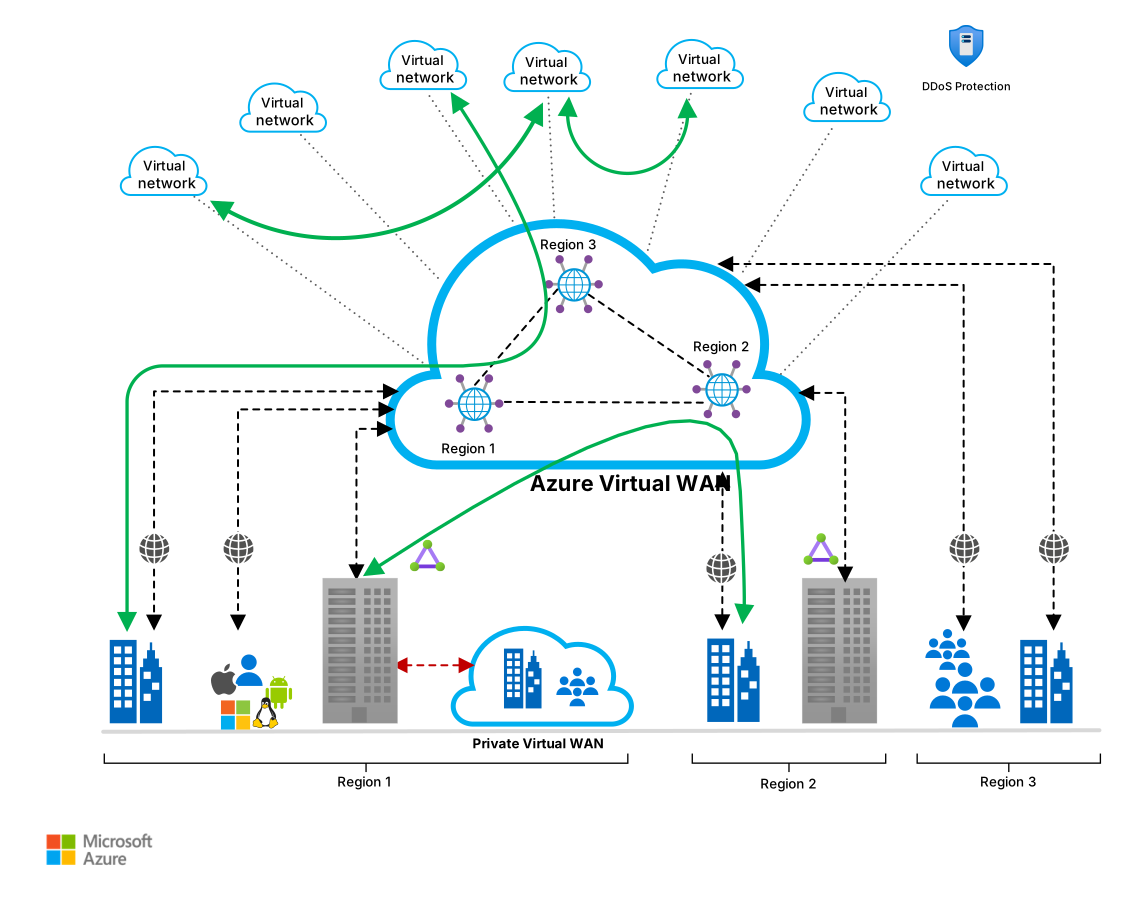
Download a Visio file of this architecture.
The previous diagram shows advantages that this architecture provides:
- A full meshed hub among Azure virtual networks
- Branch-to-Azure connectivity
- Branch-to-branch connectivity
- Mixed use of VPN and ExpressRoute
- Mixed use of user VPN to the site
- Virtual network-to-virtual network connectivity
Recommendations
You can apply the following recommendations to most scenarios. Follow these recommendations unless you have a specific requirement that overrides them.
Resource groups
The hub and each spoke can reside in different resource groups and, ideally, in different subscriptions. When you peer virtual networks in different subscriptions, both subscriptions can belong to the same Microsoft Entra ID tenant or different ones. This setup enables decentralized management of each workload while sharing services maintained in the hub.
Virtual WAN
Create a Standard Virtual WAN if your solution requires any of the following capabilities:
Scaling for higher throughputs
Private connectivity by using an ExpressRoute Premium circuit in a Global Reach location
ExpressRoute VPN interconnect
Integrated monitoring through Azure Monitor, including metrics and resource health
Standard Virtual WAN uses full-mesh connectivity by default. It supports any-to-any connectivity, including site-to-site VPN, virtual network, ExpressRoute, and point-to-site endpoints, within a single hub and across hubs.
Basic Virtual WAN supports site-to-site VPN connectivity, branch-to-branch connectivity, and branch-to-virtual network connectivity within a single hub.
Virtual WAN hub
A virtual hub is a Microsoft-managed virtual network that serves as the core of your network in a region. The hub contains various service endpoints to enable connectivity. You can have multiple hubs in each Azure region. For more information, see Virtual WAN FAQ.
When you use the Azure portal to create a hub, the portal creates a virtual hub virtual network and a virtual hub VPN gateway. A Virtual WAN hub requires an address range of at least /24. Azure uses this IP address space to reserve a subnet for the gateway and other components.
Secured virtual hub
You can create a virtual hub as a secured virtual hub or convert an existing hub to a secured one anytime after creation. For more information, see Secure your virtual hub by using Firewall Manager.
The Azure Firewall in a secured virtual hub is shared by every spoke virtual network and branch site connected to that hub. Plan for how network address translation affects workload design:
Outbound flows from any spoke or branch leave the hub sourced from one of the firewall's public IP addresses. This is source network address translation (SNAT). Azure Firewall SNATs each outbound flow to one of the attached public IP addresses, and the selection is not deterministic, so partner allowlists must cover the entire set of IP addresses attached to the secured hub firewall. Use a public IP address prefix to express that set as a contiguous range.
The number of attached public IP addresses also sets the SNAT port budget for every connected workload; plan for the aggregate concurrent outbound connection rate across all spokes and branches because exhaustion affects every workload that egresses through the hub.
Workloads published through the firewall are reachable at the firewall's public IP address. You publish a backend with a destination network address translation (DNAT) rule. Azure Firewall also SNATs DNAT-matched packets, so the backend observes the firewall instance's IP address as the source rather than the original client's IP address.
If your application requires the client's IP address, terminate the client connection upstream in a reverse proxy such as Azure Application Gateway or Azure Front Door, forward the client's IP address in the
X-Forwarded-ForHTTP header, and follow Preserve the original HTTP host name so the backend continues to observe the client's host name.
Network virtual appliances in the hub
You can deploy third-party NVAs directly inside the Virtual WAN hub for SD-WAN connectivity, next-generation firewall (NGFW) inspection, or dual-role scenarios. Supported vendors include Barracuda, Check Point, Cisco, and Fortinet, among others. Deploying NVAs in the hub eliminates the need for complex user-defined routes in spoke virtual networks and provides centralized traffic inspection with Azure-managed high availability and scaling. For more information, see About NVAs in a Virtual WAN hub.
Third-party SaaS security solutions
Virtual WAN hubs also support third-party SaaS networking and security solutions that are distinct from IaaS-based NVAs. For example, Palo Alto Networks Cloud NGFW can be deployed as a fully managed SaaS offering inside the hub, providing inline traffic inspection without managing appliance infrastructure. These SaaS solutions integrate with routing intents and are billed through Azure Marketplace. For more information, see Install Palo Alto Networks Cloud NGFW in a Virtual WAN hub.
Gateway subnet
For more information about setting up a gateway, see Hybrid network by using a VPN gateway.
For higher availability, you can use ExpressRoute with a VPN for failover. For more information, see Connect an on-premises network to Azure by using ExpressRoute with VPN failover.
A hub-spoke topology requires a gateway, even if you don't require connectivity to your on-premises network.
Virtual network peering
Virtual network peering creates a nontransitive relationship between two virtual networks. However, Virtual WAN allows spokes to connect with each other without requiring direct peering.
When you need to connect multiple spokes, you can quickly reach the limit for virtual network peerings for each virtual network. For more information, see Networking limits. Virtual WAN resolves this limitation by providing built-in connectivity between spokes. For more information, see Global transit network architecture and Virtual WAN.
You can also configure spokes to use the hub gateway to communicate with remote networks. To allow gateway traffic to flow from the spoke to the hub and connect to remote networks, do the following steps:
Configure the peering connection in the hub to allow gateway transit.
Configure the peering connection in each spoke to use remote gateways.
Configure all peering connections to allow forwarded traffic.
For more information, see Virtual network connectivity options and spoke-to-spoke communication.
Virtual network peering for a hub connection
In Virtual WAN, Microsoft manages virtual network peering. When you add a connection to a hub, Virtual WAN configures virtual network peering. As a result, all spokes have a transitive relationship.
Routing intents
Routing intents in Virtual WAN are predefined routing configurations that simplify how traffic flows between spokes, on-premises, and the internet through the hub. You can use routing intents to enforce consistent and centralized traffic flows for specific traffic categories, including the following categories:
- Internet: Traffic destined for the internet
- Private traffic: Traffic between virtual networks or from on-premises to virtual networks
When you enable routing intents on the Virtual WAN hub, Azure automatically configures the appropriate routes. Traffic that matches a given intent flows to a specified next hop, such as the following components:
- Azure Firewall for traffic inspection and filtering
- NVAs for custom traffic processing
Virtual WAN supports the following routing intents:
- Internet: Routes internet-bound traffic through a designated security appliance, such as Azure Firewall
- Private traffic: Routes network-to-network or hybrid traffic through the security path, such as an NVA or firewall
- Forced Tunnel: Routes internet-bound traffic to a security appliance in the hub for inspection, then forwards it via a learned or static
0.0.0.0/0route to an on-premises egress point rather than directly to the internet. This mode doesn't support DNAT and might introduce asymmetric routing in some topologies. For more information, see Securing internet access with routing intent.
Route maps
Route maps in Virtual WAN provide fine-grained control over advertised and received routes. Use route maps to filter, modify, or control Border Gateway Protocol (BGP) route propagation between Virtual WAN hubs and external networks, such as branches, partner networks, or SD-WAN connections. Route maps control which routes are advertised or accepted over a BGP connection.
You can attach route maps to connections, such as VPN sites, ExpressRoute circuits, or virtual network connections. Each route map consists of one or more rules. These rules include conditions such as match statements and actions such as permit, deny, or set. Azure evaluates rules in order, and the first match determines the outcome for that route. You can apply route maps in either the inbound or outbound direction.
Route maps support scalable and controlled hybrid connectivity and ensure compliance with routing policies and network segmentation. They help prevent routing loops or route leaks in large environments.
Hub extensions
To support network-wide shared tools, like Domain Name System (DNS) resources, custom NVAs, and Azure Bastion, use the virtual hub extension pattern to implement each service. Use this model to build and operate single-responsibility extensions that expose business-critical, shared services that you can't deploy directly in a virtual hub.
Spoke connectivity and shared services
Virtual WAN provides connectivity among spokes. But UDRs in the spoke traffic help isolate virtual networks. You can also host shared services on the same Virtual WAN as a spoke.
Private Link with Virtual WAN
Virtual WAN supports up to 4,000 private endpoints per hub, which enables secure connectivity to Azure PaaS services without exposing traffic to the public internet. Use Private Link to access services such as Azure Storage, Azure SQL Database, or custom services. The higher-scale private endpoint limits that are available for standard virtual networks don't apply to Virtual WAN hubs. For more information, see Share a Private Link service across Virtual WAN.
Considerations
These considerations implement the pillars of the Azure Well-Architected Framework, which is a set of guiding tenets that you can use to improve the quality of a workload. For more information, see Well-Architected Framework.
Reliability
Reliability helps ensure that your application can meet the commitments that you make to your customers. For more information, see Design review checklist for Reliability.
Virtual WAN handles routing, which helps optimize network latency among spokes and ensure predictable performance. Virtual WAN also provides reliable connectivity among different Azure regions for workloads that span multiple regions. This setup improves end-to-end visibility of network flow within Azure.
Security
Security provides assurances against deliberate attacks and the misuse of your valuable data and systems. For more information, see Design review checklist for Security.
You can convert hubs in Virtual WAN to secure hubs by using Azure Firewall. UDRs remain effective for enforcing network isolation. Virtual WAN also encrypts traffic between on-premises networks and Azure virtual networks through an ExpressRoute connection.
Azure DDoS Protection, combined with application design best practices, provides enhanced mitigation against distributed denial-of-service (DDoS) attacks. Azure DDoS Protection is available in two tiers: DDoS Network Protection, which covers entire virtual networks and includes DDoS Rapid Response and cost protection, and DDoS IP Protection, a per-IP model suited for smaller environments. For hub-spoke architectures with many public endpoints, DDoS Network Protection is recommended. Enable DDoS Protection on perimeter virtual networks.
Cost Optimization
Cost Optimization focuses on ways to reduce unnecessary expenses and improve operational efficiencies. For more information, see Design review checklist for Cost Optimization.
Use the Virtual WAN pricing page to understand and estimate the most cost-effective solution for your network topology. Virtual WAN pricing involves several key cost factors:
Deployment hours: Charges for the deployment and use of Virtual WAN hubs.
Scale unit: Fees based on the bandwidth capacity in megabits per second (Mbps) or gigabits per second (Gbps) for scaling site-to-site or point-to-site VPN and ExpressRoute gateways.
Connection unit: Costs for each connection to VPN, ExpressRoute, or remote users.
Data processed unit: Charges per gigabyte (GB) for data processed through the hub.
Routing infrastructure unit: Costs for routing capabilities in the hub. Use the Virtual WAN pricing page and the Azure Pricing Calculator for current and region-specific estimates.
Azure Firewall with secured virtual hub: Recommended but adds an extra cost per deployment unit and per data processed unit.
Hub-to-hub data transfer: Costs for transferring data between hubs. These costs are subject to inter-region (intra-continental or inter-continental) rates as detailed in Azure bandwidth pricing.
For more information about pricing that aligns with common networking scenarios, see About Virtual WAN pricing.
Operational Excellence
Operational Excellence covers the operations processes that deploy an application and keep it running in production. For more information, see Design review checklist for Operational Excellence.
Microsoft provides Virtual WAN as a managed service. From a technology perspective, it closely resembles a customer-managed hub infrastructure. However, Virtual WAN simplifies the overall network architecture by providing a mesh network topology that enables transitive network connectivity among spokes.
You should monitor Virtual WAN by using Azure Monitor. Key hub-level metrics include Routing Infrastructure Units usage (%) for capacity planning and scale monitoring, and Bits In and Bits Out to track hub traffic volume. Set alert rules when utilization or traffic approaches thresholds to proactively manage hub scale. For more information, see Azure Virtual WAN monitoring. You can also fully automate site-to-site configuration and connectivity between on-premises networks and Azure.
Performance Efficiency
Performance Efficiency refers to your workload's ability to scale to meet user demands efficiently. For more information, see Design review checklist for Performance Efficiency.
Virtual WAN helps reduce latency among spokes and across regions. Gateway throughput varies by gateway type and deployment scope. For workloads that exceed single-gateway or single-hub limits, deploy additional hubs or gateways per region to scale aggregate capacity. For current limits, see Virtual WAN limits.
Virtual WAN provides full-mesh connectivity among spokes while allowing traffic restriction based on specific needs. This architecture enables large-scale, site-to-site performance. You can also create a global transit network architecture by enabling any-to-any connectivity between globally distributed sets of cloud workloads.
Advanced scenarios
Your architecture might differ from the simple hub-spoke architecture described in this article. The following list describes guidance for advanced scenarios:
- To extend your network across multiple regions, deploy additional Virtual WAN hubs. For more information, see Global transit network architecture and Virtual WAN.
- To deploy third-party firewall or SD-WAN appliances directly in the hub, see About NVAs in a Virtual WAN hub.
- To integrate SaaS-based security solutions like Palo Alto Networks Cloud NGFW, see Install Palo Alto Networks Cloud NGFW in a Virtual WAN hub.
- To control BGP route propagation and filtering across connections, see About Virtual WAN hub route maps.
- To enforce centralized traffic inspection with routing intents, see Configure routing intent and policies through Virtual WAN.
- To use forced tunnel mode for on-premises internet egress, see Securing internet access with routing intent.
- To provide DNS resolution across spokes and on-premises, see Private resolver architecture and the virtual hub extension pattern.
Contributors
Microsoft maintains this article. The following contributors wrote this article.
Principal author:
- Yunus Emre Alpozen | Program Architect Cross-Workload
To see nonpublic LinkedIn profiles, sign in to LinkedIn.
Next steps
- Strengthen your security posture by using Azure
- Virtual Network
- ExpressRoute
- VPN Gateway
- Azure Firewall
- Azure landing zone architecture
- ExpressRoute overview
- Extend an on-premises network by using VPN