Note
Access to this page requires authorization. You can try signing in or changing directories.
Access to this page requires authorization. You can try changing directories.
Important
This feature is in Public Preview.
By default, standard endpoints support 20–200 QPS depending on index size. Real-time applications such as search bars, recommendation systems, and entity matching often require 100–1000+ QPS. On standard endpoints only, you can set a target QPS. Databricks provisions the infrastructure to best match that throughput level (best-effort, not guaranteed) when indexes are created or synced.
Important
Setting a target QPS provisions additional capacity, which increases the cost of the endpoint. You are charged for this additional capacity regardless of actual query traffic. To stop incurring these charges, reset the endpoint to the default configuration using target_qps=-1. Throughput scaling is best-effort and not guaranteed during Public Preview.
Use high QPS when:
- Your application requires more than 50 QPS of sustained throughput.
- You receive 429 (Too Many Requests) errors under normal load.
- Latency degrades as traffic ramps up, even when average utilization appears low.
Requirements
- High QPS is available for standard endpoints only. Storage-optimized endpoints are not supported.
- OAuth authentication is required for endpoints handling more than 70–100 QPS. Personal access tokens (PATs) are rate-limited to 70–100 QPS. See Use service principals with OAuth tokens.
Configure target QPS
Set a target QPS when creating a new endpoint or updating an existing one. The additional capacity needed to best match the target throughput is calculated automatically the next time an index on the endpoint is created or synced. In Public Preview, throughput scaling is best-effort and not guaranteed: actual QPS depends on your index size, vector dimensionality, query complexity, and filter usage.
Databricks UI
When creating a new endpoint:
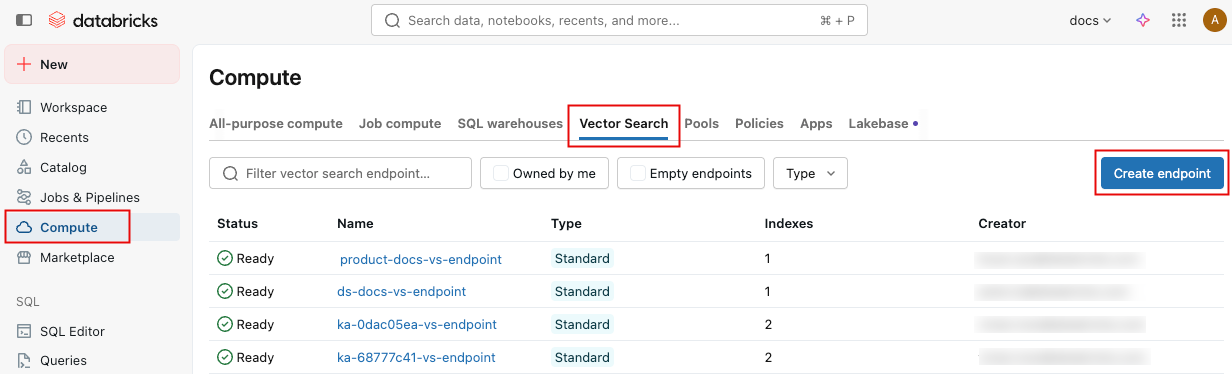
In the left sidebar, click Compute.
Click the Vector Search tab and click Create endpoint.
Under Advanced Settings, enter the Target QPS value.

When updating an existing endpoint:
Navigate to the endpoint detail page.
In the right panel, click the pencil icon
 next to Target QPS.
Enter the new value and click Save.

After changing target QPS, sync your indexes to apply the new configuration.
Python SDK
from databricks.vector_search.client import VectorSearchClient, TARGET_QPS_RESET_TO_DEFAULT

client = VectorSearchClient()

# Create a new endpoint with target QPS
endpoint = client.create_endpoint(
    name="my-high-qps-endpoint",
    endpoint_type="STANDARD",
    target_qps=500,
)

# Update an existing endpoint's target QPS
response = client.update_endpoint(name="my-endpoint", target_qps=500)

# Check scaling status
scaling_info = response.get("endpoint", {}).get("scaling_info", {})
print(f"Requested target QPS: {scaling_info.get('requested_target_qps')}")
print(f"State: {scaling_info.get('state')}")
# State is "SCALING_CHANGE_IN_PROGRESS" until the next index sync,
# then transitions to "SCALING_CHANGE_APPLIED"

# Reset to default (remove high QPS configuration)
client.update_endpoint(name="my-endpoint", target_qps=TARGET_QPS_RESET_TO_DEFAULT)
REST API
Create an endpoint with target QPS:
POST /api/2.0/vector-search/endpoints
{
  "name": "my-high-qps-endpoint",
  "endpoint_type": "STANDARD",
  "target_qps": 500
}
Update target QPS on an existing endpoint:
PATCH /api/2.0/vector-search/endpoints/<ENDPOINT_NAME>
{
  "target_qps": 500
}
Check scaling status:
GET /api/2.0/vector-search/endpoints/<ENDPOINT_NAME>
The response scaling_info field shows the requested_target_qps and scaling state. The state is SCALING_CHANGE_IN_PROGRESS until the next index sync completes, then transitions to SCALING_CHANGE_APPLIED.
Reset to default (remove high QPS):
PATCH /api/2.0/vector-search/endpoints/<ENDPOINT_NAME>
{
  "target_qps": -1
}
How scaling applies
After you set a target QPS, the required capacity is provisioned the next time an index on that endpoint is created or synced. To apply the change immediately, trigger a sync on each index hosted on the endpoint.
Note
Attempting to update target QPS while a scaling operation is in progress returns a RESOURCE_CONFLICT error. Wait for the current operation to complete before retrying.
Limitations
- No autoscaling: You must set target QPS manually based on expected traffic. If traffic exceeds the provisioned level, 429 errors occur. See Plan for query spikes.
- Standard endpoints only: Storage-optimized endpoints do not support
target_qps.