Note
Access to this page requires authorization. You can try signing in or changing directories.
Access to this page requires authorization. You can try changing directories.
Azure Repos improvements in this sprint enhance PR visibility and remove key scaling limits. External badges now clarify third‑party status checks, unresolved comments are surfaced directly in PR lists, and the removal of the Git object limit enables unrestricted repository growth for large-scale development.
Check out the release notes for details.
General
GitHub Advanced Security for Azure DevOps
Azure Boards
Azure Pipelines
Azure Repos
- Improvements to pull request status checks
- Show unresolved comments on pull request list
- Git object count limit removed
Azure Test Plans
General
Latest version of Azure DevOps Data Migration Tool
The latest version of the Azure DevOps Data Migration Tool is now available, for users who need to migrate from the Azure DevOps Server version released at the end of 2025 to Azure DevOps Services.
You can download the latest version of the Azure DevOps Data Migration Tool and check the migration guide.
GitHub Advanced Security for Azure DevOps
Deleted and disabled repositories no longer appear in security overview
Security overview now hides repositories that have been deleted or have Advanced Security disabled, so the risk and coverage views only show repositories that are actually being scanned. This cleans up stale entries that were carrying over from prior enablement state and makes the totals in security overview reflect your current footprint.
Azure Boards
Improved copy work item choices
We've improved the copy work item experience by decoupling parent and child links. Instead of copying all parent and child links together with the Include existing links option, you can now choose to copy only parent links, only child links, or both.
This provides greater flexibility and makes it easier in cases where you want to copy a work item and keep it linked to the same parent without also bringing over all child links.

Enhanced Security for GitHub Integration REST APIs
We’ve upgraded the GitHub integration REST APIs to use GitHub App OAuth tokens instead of classic OAuth tokens for user authentication. As a security enhancement, users will be prompted to re-authenticate once via a provided URL the first time they interact with GitHub connections after this change.
After completing this one-time step, all API interactions will continue as usual. This update enables automatic token refresh, reducing interruptions and eliminating the need for repeated manual reauthorization.
Azure Pipelines
Windows ARM64 agent available in public preview
The Windows ARM64 agent is now available in public preview for Windows 11. This brings native Windows ARM64 support for Azure Pipelines self-hosted agents, enabling you to run pipelines on ARM64-based Windows machines.
For more information, see the Windows self-hosted agent documentation.
Azure Repos
Improvements to pull request status checks
We added a new External badge to pull request status checks to help you distinguish custom third-party status policies from built-in Azure DevOps branch policies. Previously, external policies looked identical to standard policies like builds or required reviewers, which often caused confusion when a pull request was blocked.
With this update, external status policies are now clearly labeled in the checks experience, and hovering over the badge provides additional details about the policy owner and that it's managed outside of standard branch policies. This helps authors and reviewers quickly understand why a pull request is blocked and resolve issues faster.

Show unresolved comments on pull request list
We now highlight pull requests that contain unresolved comment threads directly in the pull request list view.
This gives authors and reviewers quick visibility into whether a pull request still needs attention before it can be completed or merged. Instead of opening each pull request to check discussion status, you can immediately see if there are outstanding review comments that still need to be addressed.
The unresolved comment indicator displays the number of unresolved threads alongside the total number of comment threads (for example, 1 / 3), making it easier to understand review progress at a glance.

Git object count limit removed
The hard limit on the number of Git objects in a repository has been removed. Previously, repositories were capped at 100 million objects, which could be a constraint for very large and active codebases. With this change, repositories can grow without an object count ceiling, improving scalability and longevity.
This especially benefits long-lived, large monorepos with extensive history, a huge number of contributors, and continuous development at scale.
Azure Test Plans
Capture actual result per step in manual test runs in public preview
This feature has been one of the top requests from the community, and we're thrilled to make it available.
You can now record the Actual Result for each step during manual test execution in Azure Test Plans. This captures the factual outcome of each step alongside Pass/Fail, giving you structured evidence of what happened during the run, useful for audits, triage, and defect reporting.
The feature is configured per test plan, with three modes:
- Disabled (default): The field is hidden and inactive.
- Enabled - Optional: The field appears; entry isn't enforced.
- Enabled - Required: Testers must enter an actual result for every step that has a defined expected result before they can proceed.

Learn more in the Actual Result documentation.
The feature is in public preview and your input is crucial. Please share your experiences, suggestions, and any issues you may encounter. You can send feedback directly via the Azure DevOps Developer Community or email us at azdo-testplans-uxr @ microsoft.com (remove the spaces).
Next steps
Note
These features will roll out over the next two to three weeks. Head over to Azure DevOps and take a look.
How to provide feedback
We would love to hear what you think about these features. Use the help menu to report a problem or provide a suggestion.
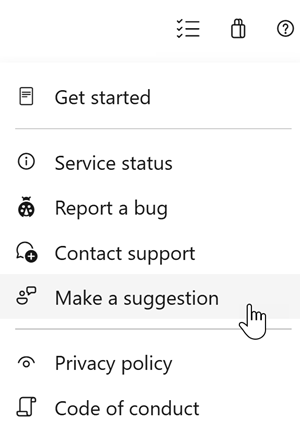
You can also get advice and your questions answered by the community on Stack Overflow.