Note
Access to this page requires authorization. You can try signing in or changing directories.
Access to this page requires authorization. You can try changing directories.
Azure Event Hubs geo-replication keeps copies of your namespace's metadata (entities, configuration, and properties) and event data in multiple Azure regions. If your primary region experiences an outage, you can promote a secondary region to keep your streaming applications running with minimal data loss.
The following sections explain how geo-replication works, compare synchronous and asynchronous replication modes, and describe how to manage secondary regions.
Note
The Event Hubs geo-replication feature is available on the Premium and Dedicated tiers only.
Geo-replication ensures that metadata and data of a namespace is continuously replicated from a primary region to the secondary region. The namespace can be thought of as being extended to more than one region, with one region being the primary and the other being the secondary.
At any time, the secondary region can be promoted to become a primary region. Promoting a secondary repoints the namespace FQDN (fully qualified domain name) to the selected secondary region, and the previous primary region is demoted to a secondary region.
Scenarios
Event Hubs geo-replication can be used in multiple scenarios.
Ensure business continuity and disaster recovery
Geo-replication ensures disaster recovery and business continuity for all streaming data on your namespace. By replicating data across regions, organizations can safeguard against data loss and ensure that their applications remain operational even in the event of a regional outage. This feature is crucial for mission-critical applications that require high availability and minimal downtime.
Global data distribution
Geo-replication can be used to distribute data globally, allowing applications to access data from the nearest region. This reduces latency and improves performance for workloads located in different parts of the world.
Data sovereignty and compliance
Organizations operating in multiple countries or regions often need to comply with data sovereignty laws that require data to be stored within specific geographic boundaries. Geo-replication allows these organizations to replicate data to regions that comply with local regulations, ensuring that they meet legal requirements while still maintaining a unified data platform.
Migration and upgrades
Geo-replication can also be used to facilitate data migration, maintenance, and system upgrades. Organizations can migrate their namespace proactively from a primary to a secondary region to allow for any maintenance and upgrades on the primary region.
Basic concepts
The geo-replication feature uses a primary-secondary replication model to replicate metadata and data. At any given time, there's a single primary region that serves both producers and consumers. The secondary region acts as a hot standby region, so you can't interact with the secondary region. However, it runs in the same configuration as the primary region, which means it can quickly step in after promotion.
Some of the key aspects of the geo-replication feature are:
- Primary-secondary replication model – Geo-replication is built on a primary-secondary replication model, where at a given time there's only one primary namespace that serves event producers and event consumers.
- Event Hubs performs fully managed byte-to-byte replication of metadata, event data, and consumer offset across secondaries with the configured consistency levels.
- Single namespace hostname - After you successfully configure a geo-replication-enabled namespace, use the namespace hostname in your client application. The hostname behaves agnostic of the configured primary and secondary regions, and always points to the primary region.
- When you initiate a promotion, the hostname points to the region selected to be the new primary region. The old primary becomes a secondary region.
- You can't read or write on the secondary regions.
- Customer-managed promotion from primary to secondary region, providing full ownership and visibility for outage resolution. Metrics are available, which can help to automate the promotion from customer side.
- You can add or remove secondary regions.
- Replication consistency - Two replication consistency settings are available: synchronous and asynchronous.
| State | Diagram |
|---|---|
| Before failover (promotion of secondary) |
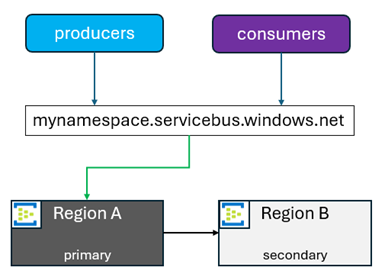
|
| After failover (promotion of secondary) |

|
Replication modes
Two replication consistency configurations are available: synchronous and asynchronous. Understand the differences between these two configurations because they affect your applications and your data consistency.
Asynchronous replication
When you use asynchronous replication, the primary commits all requests and then sends an acknowledgment to the client. Replication to the secondary regions happens asynchronously. You can configure the maximum acceptable amount of lag time - the service side offset between the latest action on the primary and the secondary regions. The service continuously replicates the data and metadata, ensuring the lag remains as small as possible. If the lag for an active secondary grows beyond the user configured maximum replication lag, the primary starts throttling incoming requests.
Synchronous replication
When you use synchronous replication, the system sends all requests to the secondary location. The secondary location commits and confirms the operation before the primary location commits. As a result, your application publishes at the rate it takes to publish, replicate, acknowledge, and commit. This process means your application depends on the availability of both regions. If the secondary region lags or is unavailable, the primary location doesn't acknowledge or commit messages and throttles incoming requests.
Replication consistency comparison
With synchronous replication:
- Latency is longer due to the distributed commit operations.
- Availability depends on the availability of two regions. If one region goes down, your namespace is unavailable.
On the other hand, synchronous replication provides the greatest assurance that your data is safe. With synchronous replication, data commits in all of the regions you configured for geo-replication, providing the best data assurance.
With asynchronous replication:
- Latency is minimally affected.
- The loss of a secondary region doesn't immediately affect availability. However, availability is affected once the configured maximum replication lag is reached.
As such, it doesn't have the absolute guarantee that all regions have the data before the commit like synchronous replication does, and data loss or duplication might occur. However, as you're no longer immediately affected when a single region lags or is unavailable, application availability improves, in addition to having a lower latency.
| Capability | Synchronous replication | Asynchronous replication |
|---|---|---|
| Latency | Longer due to distributed commit operations | Minimally affected |
| Availability | Tied to availability of secondary regions | Loss of a secondary region doesn't immediately affect availability |
| Data consistency | Data always committed in both regions before acknowledgment | Data committed in primary only before acknowledgment |
| RPO (Recovery Point Objective) | RPO 0, no data loss on promotion | RPO > 0, possible data loss on promotion |
You can change the replication mode after configuring geo-replication. You can switch from synchronous to asynchronous or from asynchronous to synchronous. If you switch from asynchronous to synchronous, the secondary region is configured as synchronous after lag reaches zero. If you're running with a continual lag for whatever reason, you might need to pause your publishers for lag to reach zero and your mode to be able to switch to synchronous. The reasons to enable synchronous replication, instead of asynchronous replication, are tied to the importance of the data, specific business needs, or compliance reasons, rather than availability of your application.
Note
If a secondary region lags or becomes unavailable, the application can't replicate to this region and starts throttling once the replication lag is reached. To continue using the namespace in the primary location, remove the afflicted secondary region. If you remove all secondary regions, the namespace continues without geo-replication enabled. You can add other secondary regions at any time. Top-level entities, which are event hubs, are replicated synchronously, regardless of the replication mode configured.
Secondary region selection
To enable the geo-replication feature, use primary and secondary regions where the feature is enabled. The geo-replication feature depends on being able to replicate published messages from the primary to the secondary regions. If the secondary region is on another continent, this choice has a major impact on replication lag from the primary to the secondary region. If you're using geo-replication for availability reasons, choose secondary regions on the same continent where possible. To get a better understanding of the latency induced by geographic distance, see Azure network round-trip latency statistics.
Note
Geo-replication requires that primary and secondary copies of the Event Hubs be on the same tier. You can't configure geo-replication across tiers.
Geo-replication management
The geo-replication feature enables you to configure a secondary region towards which to replicate metadata and data. As such, you can perform the following management tasks:
- Configure geo-replication - You can configure secondary regions on any new or existing namespace in a region by enabling the geo-replication feature.
- Configure the replication consistency - Set synchronous and asynchronous replication when you configure geo-replication. You can also switch this setting later.
- Trigger promotion/failover - All promotions are customer initiated.
- Remove a secondary - If you want to remove a secondary region, you can do so. The data in the secondary region is deleted.
Criteria to trigger promotion
Here are some cases where a promotion of a secondary to primary might be triggered.
Regional outage: If there's a regional outage affecting the primary region, promote the secondary region to ensure business continuity and minimize downtime.
Maintenance activities: During planned maintenance activities in the primary region, promoting the secondary region can help maintain high availability for mission-critical applications.
Disaster recovery: In the event of a disaster affecting the primary region, promoting the secondary region ensures that your data remains accessible and your applications continue to function.
Performance issues: If the primary region is experiencing performance issues that affect the availability or reliability of your Event Hubs, promoting the secondary region can help mitigate these issues.
Occasionally test failover mechanisms to ensure the business continuity plan is effective and your applications can seamlessly switch to the secondary region when needed.
Monitoring data replication
You can monitor the progress of the replication job by checking the replication lag metric in Application Metrics logs.
Enable Application Metrics logs in your Event Hubs namespace by following Monitoring Azure Event Hubs - Azure Event Hubs | Microsoft Learn.
After enabling Application Metrics logs, produce and consume data from the namespace for a few minutes before you start to see the logs.
To view Application Metrics logs, go to the Monitoring section of the Event Hubs page, and select Logs on the left menu. Use the following query to find the replication lag (in seconds) between the primary and secondary namespaces.
AzureDiagnostics
  | where TimeGenerated > ago(1h)
  | where Category == "ApplicationMetricsLogs"
  | where ActivityName_s == "ReplicationLag
The column
count_dshows the replication lag in seconds between the primary and secondary region.
Publishing data
Publishing applications can send data to geo-replicated namespaces through the namespace hostname of the geo-replication-enabled namespace. The publishing approach is the same as the non-geo-replication case. You don't need to make any changes to data plane SDKs or client applications.
Event publishing might not be available during the following circumstances:
- After requesting promotion of a secondary region, the existing primary region rejects any new events that are published to the event hub.
- When replication lag between primary and secondary regions reaches the max replication lag duration, the publisher ingress workload might get throttled.
Publisher applications can't directly access any namespaces in the secondary regions.
Consuming data
Consuming applications can consume data by using the namespace hostname of a namespace with the geo-replication feature enabled. Consumer operations aren't supported from the moment that promotion starts until promotion finishes.
Checkpointing and offset management
Event-consuming applications can maintain offset management the same way they do with a non-geo-replicated namespace. Geo-replication-enabled namespaces don't need special consideration for offset management.
Warning
In the event of forced failover (that is, non-graceful failover), some data might be lost because it's not yet copied over. This data loss might cause the offsets of that specific data to be different across the primary and secondary regions for the namespace. However, the offsets stay within the bounds of the maximum replication lag configured for the namespace. In such cases, start consuming from the last committed offset. Some data might have duplicate processing and you must handle it on the client side.
Kafka
Consumers commit offsets directly to Event Hubs, and the system replicates offsets across regions. Therefore, consumers can start consuming from where they left off in the primary region.
Here's a list of supported Apache Kafka clients:
| Client name | Version |
|---|---|
| Apache Kafka | 2.1.0 or later |
| Librdkafka and derived libraries | 2.1.0 or later |
For other libraries, support depends on the API version:
| API name | Version supported |
|---|---|
| Metadata API | 7 or later |
| Fetch API | 9 or later |
| ListOffset API | 4 or later |
| OffsetFetch API | 5 or later |
| OffsetForLeaderEpoch API | 0 or later |
Event Hubs SDK and AMQP
For AMQP, users manage the checkpoint by using a checkpoint store such as Azure Blob storage or a custom storage solution. If there's a failover, the secondary region must have the checkpoint store so that clients can retrieve checkpoint data and avoid loss of messages.
The latest version of the Event Hubs SDK includes changes to checkpoint representation to support failovers. Use the latest versions of the SDKs, but prior versions of the following SDKs are supported as well.
| Language | Package name |
|---|---|
| C# | Azure.Messaging.EventHubs |
| C# | Microsoft.Azure.EventHubs |
Warning
As part of the implementation, the checkpoint format is adapted when you enable geo-replication on a namespace. Subsequent checkpoints after the geo-replication pairing are written with a new format. If you force promote a secondary region to primary right after the geo-replication pairing is done but before a new checkpoint is stored (this situation might happen in the case of forced promotion or failover), new data published after promotion might be lost.
In such cases, start consuming from the last committed offset. Some data might have duplicate processing and you must handle it on the client side.
Upgrade to the latest versions of the SDKs.
Considerations
Keep in mind the following considerations:
- In your promotion planning, consider the time factor. For example, if you lose connectivity for longer than 15 to 20 minutes, you might decide to initiate the promotion.
- You should rehearse promoting a complex distributed infrastructure at least once.
Pricing
Pricing varies based on the tier you pick, but generally has two parameters:
- The compute charge for the cluster or namespace.
- The bandwidth charge for the data being replicated between the primary and secondary regions.
Note
To determine the charges, see the pricing details listed at Azure Event Hubs. The geo-replication charge depends on the location of the primary region.
Dedicated clusters
When you use geo-replication with Event Hubs dedicated clusters, you need at least two dedicated clusters in separate regions. You can use these clusters to host namespaces other than the one being geo-replicated. You pay for these dedicated clusters separately based on the number of Capacity Units (CUs) allocated to each.
When you enable geo-replication, the only extra charge is the bandwidth charge for the data replicated from primary to secondary. This charge depends on the location of the primary region.
Premium namespaces
For Premium namespaces, when you enable geo-replication, you get the same number of processing units (PUs) in the secondary region. You pay for the number of PUs you use and the bandwidth for the data transferred between the primary and secondary region.
For example, if you enable geo-replication on a Premium namespace that you provisioned with 4 PUs, you pay for
- 4 PUs in the primary region,
- 4 PUs in the secondary region,
- Geo-replication charge per GB of data replicated.
You pay bandwidth charges based on the data transferred between the primary and secondary regions.
Pricing meters
The pricing meters for the geo-replication data transfer bandwidth charge appear with the following details:
| Product Name | Meter Description |
|---|---|
| Service Bus | Service Bus - Geo Replication Zone 1 GB Data Transfer - REGION NAME |
| Service Bus | Service Bus - Geo Replication Zone 2 GB Data Transfer - REGION NAME |
| Service Bus | Service Bus - Geo Replication Zone 3 GB Data Transfer - REGION NAME |
Private endpoints
This section provides additional considerations when using geo-replication with namespaces that use private endpoints. For general information about using private endpoints with Event Hubs, see Integrate Azure Event Hubs with Azure Private Link.
When you implement geo-replication for an Event Hubs namespace that uses private endpoints, create private endpoints for both the primary and secondary regions. Configure these endpoints against virtual networks that host both primary and secondary instances of your application. For example, if you have two virtual networks, VNET-1 and VNET-2, you need to create two private endpoints on the Event Hubs namespace, using subnets from VNET-1 and VNET-2 respectively. Set up the virtual networks with cross-region peering, so that clients can communicate with either of the private endpoints. Finally, manage the DNS so all clients get the DNS information that points the namespace endpoint (namespacename.servicebus.windows.net) to the IP address of the private endpoint in the current primary region.
Important
When you promote a secondary region for Event Hubs, update the DNS entry to point to the corresponding endpoint.

This approach provides the benefit that failover can occur independently at the application layer or on the Event Hubs namespace:
- Application-only failover: In this scenario, the application moves from VNET-1 to VNET-2. Since private endpoints are configured on both VNET-1 and VNET-2 for both primary and secondary namespaces, the application continues to function seamlessly.
- Event Hubs namespace-only failover: If the failover occurs only at the Event Hubs namespace level, the application remains operational because private endpoints are configured on both virtual networks.
By following these guidelines, you can ensure robust and reliable failover mechanisms for your Event Hubs namespaces that use private endpoints.
Related content
To learn how to use the Geo-replication feature, see Use Geo-replication.