Note
Access to this page requires authorization. You can try signing in or changing directories.
Access to this page requires authorization. You can try changing directories.
Use these design recommendations when contributing modules to the System Application in BCApps. They describe how to organize public APIs, implementation code, tests, and documentation. They aren't general AL language requirements.
Expose supported functionality through a public facade and keep implementation details behind that API. The following diagram illustrates this separation.
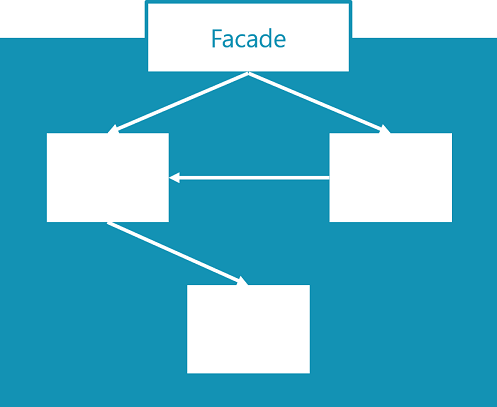
One module, one project
System Application modules have their own development projects and app.json files. BCApps also contains a combined System Application project. A module's conceptual boundary and development project don't necessarily match the app boundary in the compiled package.
Learn more about organizing the files in Project setup.
Packaging and layering
Organize modules in the appropriate application folder. App manifests and build configuration determine the projects, dependencies, and packages. Folder placement alone doesn't establish an AL app dependency or access boundary.
Dependencies between application layers
Keep module dependencies within the same application layer or directed toward lower-level capabilities. For example, the Base Application depends on Business Foundation and System Application. This dependency direction is an architectural convention, not an AL restriction based on folder names.
Choose the compilation target
Prefer cloud-compatible public APIs and avoid unnecessary dependencies on restricted platform functionality. Follow the owning BCApps project's target setting in app.json. The System Application and Business Foundation manifests use OnPrem, which controls compilation API availability.
When restricted platform functionality is needed, wrap it in an AL API that validates inputs and exposes only the intended operations. Keep restricted types and implementation details behind the facade.
Learn more about the difference between Cloud and OnPrem in Compilation scope overview.
Control object accessibility
Expose only the objects needed by the public API. These objects can include facade codeunits, tables, pages, enums, interfaces, queries, and XMLports. Mark implementation objects Internal where the object type supports the Access property. Pages don't support this property.
Internal restricts compile-time access across AL app boundaries, subject to the internalsVisibleTo setting. It doesn't isolate conceptual module folders compiled into the same app.
Important
Access modifiers aren't a security boundary. Learn more in Using access modifiers in AL.
Facade codeunits
Use a public facade for modules that expose callable functionality. Modules that supply types, aliases, or other declarative capabilities don't need an artificial facade codeunit.
Use these recommendations for service facades:
- Set
Accessexplicitly toPublicto identify the codeunit as part of the supported API. - Keep the facade thin and delegate business logic to implementation codeunits.
- Place supported extension-point events in the facade where practical. Use an appropriate procedure access modifier to restrict direct publisher invocation. Implementation-level events can remain in implementation objects.
- If a publisher must be public, document why callers outside the app need to raise the event.
- Use a short, meaningful name. Internal implementation codeunits can use an
Implsuffix.
Public helper or value objects can contain the behavior and local procedures needed to represent their API.
Keep business logic in implementation codeunits
Place business logic in implementation codeunits. Keep code in pages and tables focused on the behavior those objects require.
Plan object extensibility
Decide which objects support extensions. To prevent extension objects for a table, page, report, or enum, set its Extensible property to false. Learn more in Extensible property.
For table fields, use the Access property to control accessibility.
| Access | Description |
|---|---|
Local |
Accessible only by code in the table or table extension that declares the field. |
Internal |
Accessible within the same app and from apps granted access through internalsVisibleTo. |
Protected |
Accessible by code in the declaring table and table extensions of that table, not page extensions. |
Public |
Accessible by code in the same app and other apps that reference it. |
Procedure accessibility is specified separately in the procedure declaration. Don't apply the table-field access matrix to page controls. Learn more in Access property and AL methods.
Document and test the public API
Document publicly accessible objects and test the module's public API. Learn more in Documentation guidelines and Testing module behavior.
Choose single-instance behavior
Use SingleInstance when instance reuse or retained session and company state is intentional. Consider the lifetime of global variables and measure any performance benefit. Frequent calls alone aren't sufficient justification. Learn more in SingleInstance property.
Organize .NET type aliases
Keep module-specific .NET aliases with the module. Use the DotNet Aliases module for shared aliases used by multiple modules.
Project setup
Follow the current BCApps contribution guidelines and the layout of neighboring modules.
- Name the module after the entity or capability it provides.
- Place source files under
src\System Application\App\<ModuleName>\src. - Place corresponding tests under
src\System Application\Test\<ModuleName>\src. - Keep the module's
app.jsonfile and README in its project folder.
Testing module behavior
Test the public API from separate test projects. Additional implementation-level tests can use internal APIs where the project's internalsVisibleTo configuration permits it.
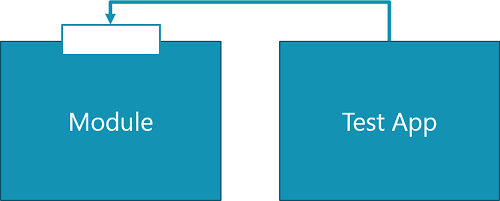
The source and test folders can share the module name. The test app has its own identity, such as Base64 Convert Test. Keep test code out of production app projects.
Documentation guidelines
Document the module's purpose and its supported public API.
Module metadata and README
Give the module a user-friendly name, a concise brief, and a purpose-focused description in app.json. Describe the module's purpose and usage in its README. These recommendations are contributor recommendations, not additional AL language requirements.
Public object documentation
Use XML documentation comments to describe public objects. Include a summary of the object's purpose. In AL source, prefix each XML documentation line with ///.
<summary>
Provides helpers for converting text to and from Base64.
</summary>
Public procedure documentation
Document public procedures with a summary, a description for each parameter, and a return-value description when the procedure returns a value.
For example, the following XML describes a procedure that accepts an inputText parameter and returns Base64-encoded text. Prefix each line with /// in the AL source.
<summary>
Converts text to its Base64 representation.
</summary>
<param name="inputText">The text to encode.</param>
<returns>The Base64-encoded text.</returns>
Related information
Get started with modules in the System Application
Create a new module in the System Application
BCApps contribution guidelines