Note
Access to this page requires authorization. You can try signing in or changing directories.
Access to this page requires authorization. You can try changing directories.
Note
The harness used to build this agent uses usage-based billing. Using, building, testing, and evaluating agents might consume Copilot Credits. Learn more in Overview of usage-based billing.
Microsoft Copilot Studio supports AI models from multiple providers, each with different capabilities and availability requirements. You can select a model for an agent that uses the Microsoft Copilot harness, and you can explore experimental and preview models before they become generally available.
This article lists the models currently available and the models that are retiring or retired. It also explains how provider settings, your region, and admin settings affect which models you can use and where your data is processed.
Model release types and availability labels
Release types describe production readiness. Lifecycle and availability labels describe a model's status or conditions for use.
Release type
| Release type | Description |
|---|---|
| Experimental | Used for experimentation, and not intended for production use. Subject to preview terms and limitations on availability and quality. |
| Preview | Might eventually become a generally available model, but currently not intended for production use. Subject to preview terms and limitations on availability and quality. |
| Generally available (GA) | Models without a release tag are generally available. You can use these models for scaled and production use. In most cases, generally available models have no limitations on availability and quality, but some might still have some limitations, like regional availability. |
Other label
| Other label | Meaning |
|---|---|
| Retiring soon | Still available, but will retire on a set date. Switch your agent to the replacement model before that date. To see the date and replacement for each model, see Model retirement lifecycle. |
| Retired | No longer available. Agents that used a retired model automatically switch to its replacement model. To see the replacement for each model, see Model retirement lifecycle. |
| Early access environment | Only available in early release cycle environments. These environments receive new updates and features first. Learn more in Early release cycle environments. |
Model lifecycle summary
The Available models table lists the models you can currently select for your agent. The Model retirement lifecycle table lists models that are retiring soon or have retired, along with their replacement models. A model's availability also depends on its provider settings and your region. Learn more in AI model providers and data processing.
Available models
| Model | Provider | Release type | Lifecycle note |
|---|---|---|---|
| GPT-5.6 Terra | OpenAI | GA | |
| GPT-6 Astra | OpenAI | GA | |
| GPT-6 Sol | OpenAI | GA | |
| GPT-6.1 Sol | OpenAI | GA | |
| GPT-6.1 Terra | OpenAI | GA | |
| GPT-6.2 Sol | OpenAI | GA | |
| GPT-6.2 Astra | OpenAI | GA | |
| GPT-6 Luna | OpenAI | GA | |
| Claude Sonnet 4.6 | Anthropic | GA | Retiring February 15, 2027 |
| Claude Sonnet 5 | Anthropic | GA | Retiring February 15, 2027 |
| Claude Haiku 5.5 | Anthropic | GA | |
| Claude Sonnet 5.5 | Anthropic | GA | |
| Claude Fable 5 | Anthropic | GA | |
| Claude Fable 5.1 | Anthropic | GA | |
| Claude Fable 5.2 | Anthropic | GA | |
| Claude Opus 4.8 | Anthropic | GA | Retiring February 15, 2027 |
| Claude Opus 5 | Anthropic | GA | Retiring February 15, 2027 |
| Claude Opus 5.5 | Anthropic | GA | |
| Grok 4.6 | SpaceXAI | GA | |
| Mistral Large 4 | Mistral | Preview | |
| Mistral Medium 3.5 | Mistral | Experimental | Available only in early-access Europe environments. Retiring November 30, 2026. |
Model retirement lifecycle
The following models are retiring soon or have retired. Review the listed replacement and any applicable exceptions. A replacement designation doesn't by itself establish whether migration is automatic.
| Model | Provider | Lifecycle status | Date | Replacement model |
|---|---|---|---|---|
| GPT-5 Chat (EU/EFTA, data movement across regions turned off) | OpenAI | Retiring soon | November 30, 2026 | GPT-6 Luna |
| Mistral Medium 3.5 | Mistral | Retiring soon | November 30, 2026 | Mistral Large 4 |
| Claude Opus 4.8 | Anthropic | Retiring soon | February 15, 2027 | Claude Opus 5.5 |
| Claude Opus 5 | Anthropic | Retiring soon | February 15, 2027 | Claude Opus 5.5 |
| Claude Sonnet 4.6 | Anthropic | Retiring soon | February 15, 2027 | Claude Sonnet 5.5 |
| Claude Sonnet 5 | Anthropic | Retiring soon | February 15, 2027 | Claude Sonnet 5.5 |
| GPT-5 Chat | OpenAI | Retired | November 12, 2026 | GPT-6 Luna |
| GPT-5.6 Sol | OpenAI | Retired | November 12, 2026 | GPT-6.1 Sol |
| GPT-5.6 Luna | OpenAI | Retired | November 12, 2026 | GPT-6 Luna |
| GPT-5.5 Chat | OpenAI | Retired | October 31, 2026 | GPT-6 Luna |
Important
GPT-5 Chat retired on November 12, 2026, with the following exceptions:
- EU/EFTA environments with data movement across regions turned off: GPT-5 Chat remains available until November 30, 2026. This exception doesn't apply to environments in the United Kingdom, where GPT-5 Chat availability isn't affected by this specific restriction. Because of EU AI Act requirements, access can't be extended beyond this date. We recommend that you test your agents with GPT-6 Luna before November 30, 2026.
- FedRAMP environments: GPT-5 Chat remains available until further notice.
To check your data movement setting, see Move data across regions for Copilots, AI agents, and generative AI features.
AI model providers and data processing
Copilot Studio supports AI models from OpenAI, Anthropic, SpaceXAI, and Mistral. The models available to you depend on your region, your organization's AI provider settings, and your Power Platform administrator's environment configuration.
OpenAI models
Either Microsoft or OpenAI can operate GPT models. The OpenAI subprocessor setting controls whether you can use GPT models that OpenAI operates in Copilot Studio.
- GPT models operated by Microsoft: The OpenAI subprocessor setting doesn't affect these models.
- GPT models operated by OpenAI: You can use these models only when the OpenAI subprocessor setting is turned on.
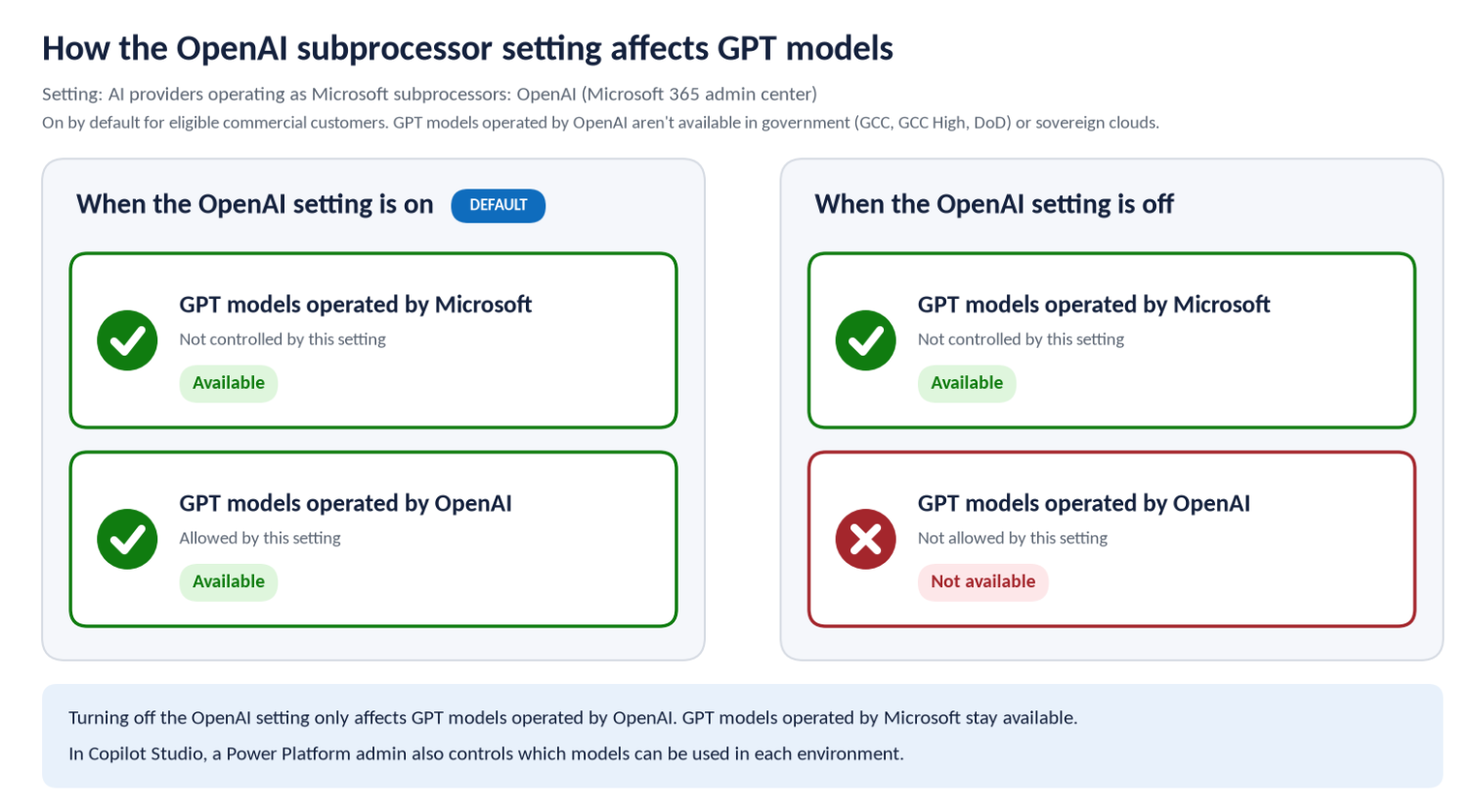
If you turn off the OpenAI subprocessor setting, you can't use GPT models that OpenAI operates, but GPT models that Microsoft operates aren't affected.
Models from other providers
Provider settings control models from Anthropic, SpaceXAI, and Mistral. Each setting determines whether you can use models from that provider in Copilot Studio. Some provider settings are turned on by default, while an administrator must turn on others. For each provider's setting and default, see Provider settings and terms.
Provider settings and terms
Providers work as either Microsoft subprocessors or independent processors. Subprocessors, such as OpenAI and Anthropic, are covered by the Microsoft Product Terms, the Microsoft Data Protection Addendum (DPA), and Enterprise Data Protection. Independent processors, such as SpaceXAI and Mistral, operate under their own terms, which an admin must accept before their models are available.
| Provider setting | Models it turns on | On by default | Setup and terms |
|---|---|---|---|
| AI providers operating as Microsoft subprocessors: OpenAI | GPT models operated by OpenAI. GPT models operated by Microsoft stay available when this setting is off. | Yes | OpenAI as a subprocessor in Microsoft Online Services |
| AI providers operating as Microsoft subprocessors: Anthropic | Claude models | Yes, except in the EU/EFTA and the United Kingdom | Claude models from Anthropic in Microsoft Online Services |
| Anthropic models with data retention | Claude Fable models | No | Claude models from Anthropic in Microsoft Online Services |
| AI providers operating as independent processors: SpaceXAI | Grok models | No | Connect to SpaceXAI models |
| AI providers operating as independent processors: Mistral AI | Mistral models | No | Connect to Mistral AI models |
How admins make models available
Enabling a provider setting doesn't guarantee access to every model from that provider. Model availability also depends on regional support and environment-level settings managed by your Power Platform administrator.
Admins can turn on a provider's setting for all users or for specific users and groups. Turning on a provider's setting in the Microsoft 365 admin center doesn't automatically make its models available in Copilot Studio. A Power Platform admin must also allow the provider's models in each environment or environment group in the Power Platform admin center. For steps, see Allow external language models for generative responses. If a model you need isn't available, contact your admin.
Where your data is processed
Depending on your region and the model, your data might be processed outside your country or region. In-country processing keeps your data within your country, while in-region processing, such as the EU Data Boundary, keeps it within a broader geographic region.
GPT models operated by OpenAI aren't included in in-country data processing commitments. Admins can use the Generative AI Features: Move data across regions setting in the Power Platform admin center to restrict cross-region data movement, but not all models follow this setting. To find it, go to Manage > Environments, select your environment, and then select Edit in the Generative AI features card. GPT-5 Chat is currently the only model with in-country capacity, and only in specific countries. It's available only when cross-region data movement is turned off. Learn more in Move data across regions for Copilots, AI agents, and generative AI features.
EU Data Boundary
For organizations in the EU/EFTA, GPT models are included in the EU Data Boundary, except as noted in the EU Data Boundary documentation. Claude models are currently processed outside the EU Data Boundary.
Model use categories
The Auto category supports mixed workloads by routing requests dynamically, including knowledge and action scenarios. Latency, cost, and reasoning effort might vary by request.
Limitations of experimental and preview models
Experimental and preview models are intended for evaluation and testing, not production use. They might vary in response quality, latency, performance, and message consumption. They might time out or become unavailable. These models are subject to preview terms.
If you publish an agent that uses an experimental or preview model, usage is billed at the applicable established rates. Review current billing guidance before publication.
Important
Don't use models labeled Experimental or Preview for production workloads. Such models might be subject to limited capacity, slowdowns, timeouts, or future availability changes.
Troubleshoot model access
If a model you want to use isn't available, your admin might need to turn it on:
- Microsoft 365 admin center: An admin must allow the model's provider. For example, Claude models require the Anthropic provider setting, and Grok and Mistral models require the admin to accept the provider's terms. Learn more in Provider settings and terms.
- Power Platform admin center: Some preview and experimental models require an admin to turn on the Preview and experimental AI models setting for your environment.
For help, contact your admin.