Note
Access to this page requires authorization. You can try signing in or changing directories.
Access to this page requires authorization. You can try changing directories.
This reference architecture shows how to synchronize master data between two Dataverse environments by using Power Automate and dataflows in Power Platform. It demonstrates a one-to-one synchronization pattern where one environment acts as the authoritative source and another receives data.
Tip
This article provides an example scenario and a generalized example architecture to illustrate how to maintain master data in one Dataverse environment and synchronize to another. The architecture example can be modified for many different scenarios and industries.
Architecture diagram
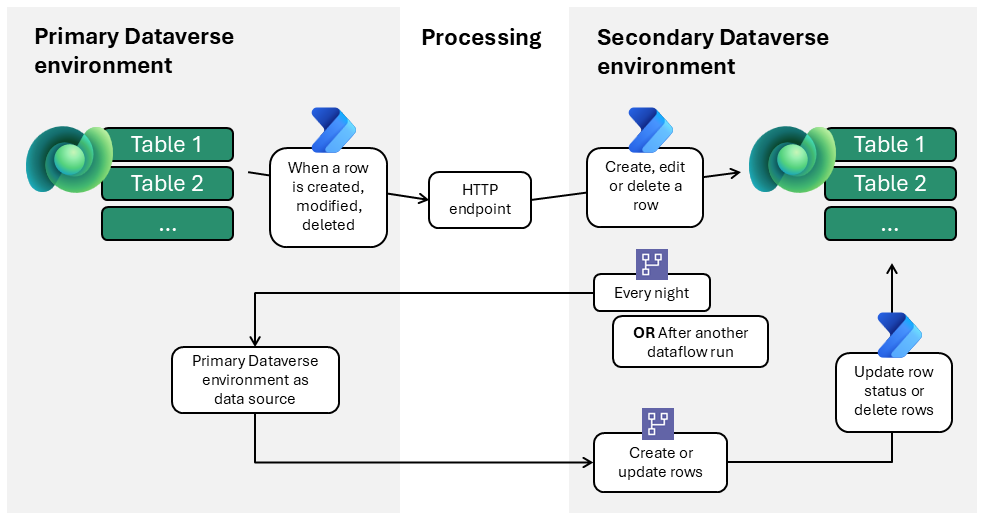
Workflow
The following steps describe the workflow shown in the example architecture diagram:
Event-driven synchronization via Power Automate
CRUD (create, read, update, delete) operations in the primary Dataverse environment trigger Power Automate flows.
Event-driven synchronization uses a two-step flow chain:
- A cloud flow sends an HTTP POST to a published endpoint.
- A subscriber cloud flow is triggered by the webhook, processes the payload, and applies the update in the secondary Dataverse environment in near real-time.
Endpoints are parameterized for application lifecycle management (ALM) and security groups manage access.
Bulk synchronization via dataflows
The secondary Dataverse environment contains the dataflows.
Each dataflow connects to the primary Dataverse environment as its data source.
Dataflows run on a fixed schedule (for example, nightly or after another dataflow runs successfully) or on demand (for example, for initial setup).
Upserts are performed by using an alternate key to avoid duplicates. This method updates existing data and inserts new records when no match exists.
Status fields are managed through a dedicated "sync status" column. A Power Automate flow updates the actual status field accordingly. This flow runs after the dataflow and is required because a dataflow can't change row statuses or delete records that are removed (absent) in the primary Dataverse environment.
Error handling and reconciliation
Nightly dataflows in the secondary environment correct any missed or failed event-driven updates.
Manual intervention might be required for data quality problems (for example, missing keys).
Components
Microsoft Dataverse: Supports the two-environment requirement.
Dataflows for Power Platform: Ideal for bulk operations, such as initial data population and synchronization. Use bulk extract, transform, and load (ETL) for scheduled synchronization, configured in the secondary environment.
Power Automate cloud flows: Provide fast, record-specific updates and compensate for limitations of dataflows. Cloud flows can trigger a dataflow when another dataflow successfully completes (such as when one table contains a lookup field to another, and that referenced record must already exist in the secondary Dataverse environment), send an error message when a dataflow fails, update record statuses, and delete records.
Security groups and service accounts: Provide access management and ownership.
Scenario details
This architecture is designed for a one-to-one relationship: a single master data management (MDM) environment linked to another single environment. Scenarios where one master environment must synchronize with multiple other environments require a more scalable or distributed solution.
Business problem
This solution addresses the challenge of synchronizing multiple tables between two distinct Dataverse environments. The primary environment acts as the authoritative source, while the secondary environment contains existing tables that you must populate and update with master data.
Using virtual tables isn't feasible when the secondary system's tables already exist and require row-level security.
Example use case
A leisure and hospitality organization manages its core master data, such as hotels and room inventories, in a dedicated Dataverse environment. The primary environment includes a model-driven app that the master data management team uses exclusively to maintain accurate and up-to-date operational information.
A separate department within the same organization is responsible for several financial and reconciliation processes. To streamline these processes, the department wants to build its own model-driven app in an isolated Dataverse environment. However, their application still requires access to foundational master data such as hotel and room details.
The team rejected virtual tables because the financial team needed to enrich records with department-specific attributes governed by strict row-level security.
Embedding the financial app inside the primary MDM environment isn't an option either. Allowing financial makers or administrators into the MDM environment exposes connectors, solutions, API permissions, and sensitive data that must remain restricted to the MDM development team.
These requirements led the organization to adopt the synchronization architecture described in this article.
Value created
This architecture delivers a robust, maintainable solution for synchronizing master data between two Dataverse environments when virtual tables aren't an option. Directly populating and updating existing tables in the secondary environment ensures data consistency and operational reliability.
The approach uses only Power Platform components, such as dataflows and Power Automate, resulting in a solution that's simple to deploy, easy to manage, and avoids unnecessary complexity.
Because the architecture is tailored for a one-to-one environment relationship, it minimizes overhead and maximizes transparency. It's ideal for organizations that need straightforward, dependable master data synchronization without large-scale, multi-environment management.
Considerations
These considerations implement the pillars of Power Platform Well-Architected, a set of guiding tenets that improve the quality of a workload. Learn more in Microsoft Power Platform Well-Architected.
Reliability
Nightly dataflows ensure consistency.
Event-driven flows deliver fast updates.
Manual monitoring detects data quality issues.
Security
Service accounts and security groups for access control. When using dataflows, you can't assign service principals as owners.
Parameterized HTTP endpoints for ALM compatibility.
Dataflows in isolated solutions to avoid unnecessary manual work. There's a specific reason for isolating dataflows in a dedicated solution: after each deployment, you must manually re-establish the dataflow connection. By placing dataflows in a separate solution that you deploy only when you change the dataflows, you avoid unnecessary manual work when deploying other components of the main solution.
Operational Excellence
Automated scheduling and orchestration of dataflows.
Monitoring and alerting for failed syncs.
Performance Efficiency
Dataflows optimized for bulk operations.
Event‑driven Power Automate flows minimize latency for critical, record‑level updates. When designing event‑driven flows, ensure that action volume and concurrency remain within Power Automate service limits. High‑frequency CRUD activity can trigger throttling, especially in scenarios where flows execute tens of thousands of actions per day. For business‑critical or high‑throughput integrations, apply appropriate Power Automate licensing to increase throughput limits and avoid unexpected throttling. This approach reduces escalation risks and ensures predictable performance.
Experience Optimization
Requires minimal manual intervention.
Clearly separates bulk and event-driven syncs.
Contributors
Microsoft maintains this article. The following contributors wrote this article.
Principal authors:
- Lothar van Diessen, Solution Architect
Related resources
- What are dataflows?
- Power Automate templates for the dataflows connector
- Dataverse as a master data system
- Understand platform limits and avoid throttling
- CRM data migration to Dataverse: Key insights and best practices
- Migrate data between Microsoft Dataverse environments by using the dataflows OData connector