Note
Access to this page requires authorization. You can try signing in or changing directories.
Access to this page requires authorization. You can try changing directories.
Workspace monitoring gives you log-level visibility for all items in a workspace, including Copy jobs. It stores execution logs in a monitoring eventhouse so you can query and analyze them using KQL (Kusto Query Language). Copy job produces the CopyJobActivityRunDetailsLogs monitoring table, which logs one record for each source-to-destination table or object mapping in a Copy job run.
Enable workspace monitoring
In your Fabric workspace, select Workspace Settings, then select the Monitoring tab.
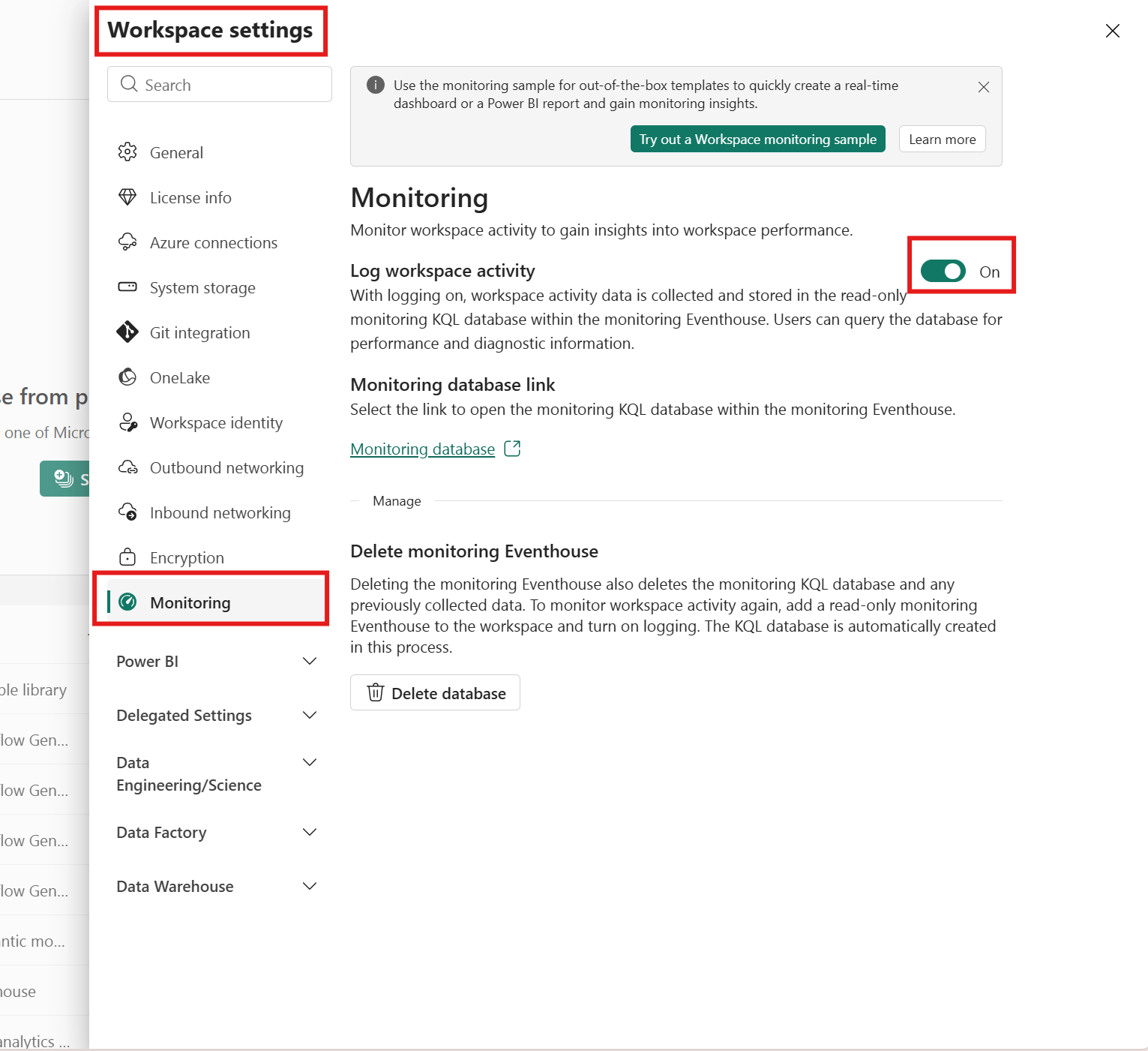
Turn on Log workspace activity. This creates an eventhouse in your workspace to store logs. Fabric also creates a read-only KQL database inside the eventhouse for monitoring data.
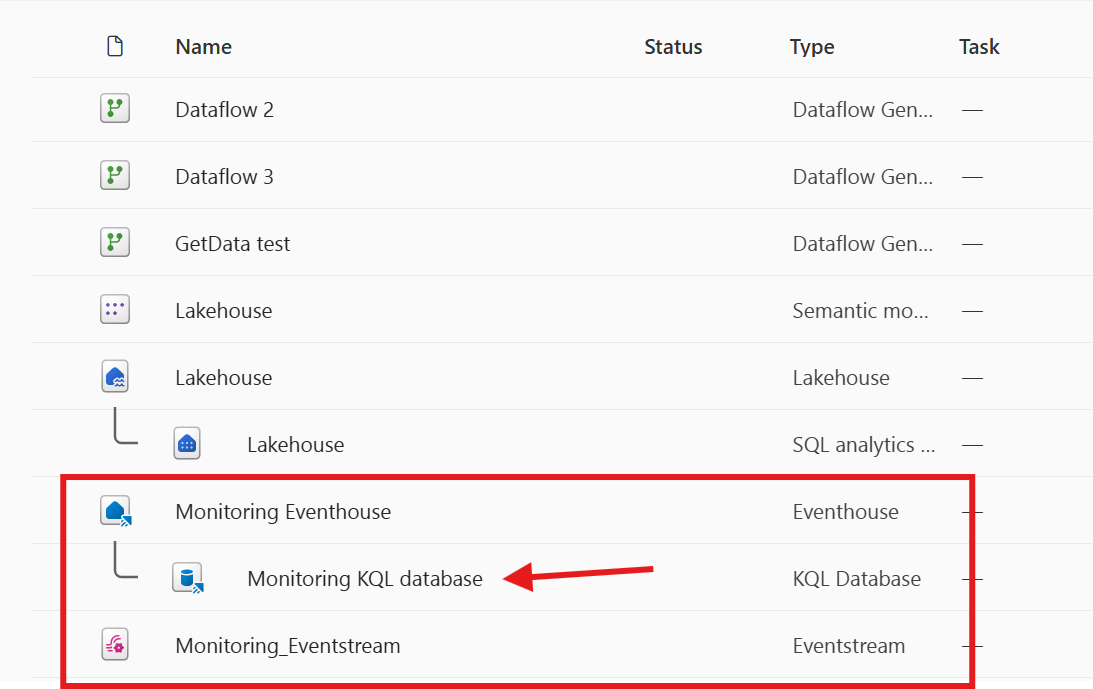
Go to the KQL database. You can find it in the Monitoring database link within the monitoring settings or in your workspace.
Review CopyJobActivityRunDetailsLogs
The CopyJobActivityRunDetailsLogs table captures run details for each Copy job execution at the individual activity level. A Copy job can contain multiple table or object mappings, and each mapping generates its own activity run. For example, if a Copy job moves data from three source tables to three destination tables, the table contains three activity run records per job execution—one for each source-to-destination pair. Use this table to monitor overall run status, throughput, data movement metrics, and diagnose issues for every individual source-to-destination data movement.
CopyJobActivityRunDetailsLogs schema
The following table describes the schema of CopyJobActivityRunDetailsLogs:
| Column name | Column type | Description |
|---|---|---|
| Timestamp | datetime | The timestamp (UTC) when the log entry was generated. |
| ItemId | string | Unique ID of the Copy job item. |
| ItemKind | string | Type of item that's logging the operation. |
| ItemName | string | The name of the Copy job item. |
| CopyJobRunId | string | Unique identifier of the parent Copy job run. |
| WorkspaceId | string | Unique identifier of the Fabric workspace that contains the item. |
| WorkspaceName | string | The name of the workspace that contains the item. |
| CapacityId | string | Unique identifier of the capacity that hosts the item. |
| CapacityName | string | The name of the capacity that hosts the item. |
| Region | string | The Azure region where the operation was executed. |
| Identity | string | The identity associated with the operation. |
| CustomerTenantId | string | The tenant ID of the customer. |
| WorkspaceMonitoringTableName | string | The name of the table where records belong. |
| DurationMs | long | Amount of time in milliseconds taken by the activity run. |
| Status | string | Status of the activity run. |
| RunId | string | Unique identifier of the activity run. |
| ScheduledTime | datetime | Scheduled start time for the activity run. |
| StartTime | datetime | Actual start time of the activity run. |
| EndTime | datetime | Actual end time of the activity run. |
| SourceConnectionType | string | The connection type of the data source. |
| SourceType | string | The type of the data source. |
| SourceName | string | The name of the data source. |
| DestinationConnectionType | string | The connection type of the data destination. |
| DestinationType | string | The type of the data destination. |
| DestinationName | string | The name of the data destination. |
| RowsRead | long | Number of rows read from the source. |
| RowsWritten | long | Number of rows written to the destination. |
| FilesRead | long | Number of files read from the source. |
| FilesWritten | long | Number of files written to the destination. |
| DataReadKB | long | Amount of data read in kilobytes. |
| DataWrittenKB | long | Amount of data written in kilobytes. |
| ThroughputBytesPerSec | long | Data throughput in bytes per second. |
| ErrorCode | string | Error code if the activity run failed. |
| FailureType | string | The type of failure if the activity run failed. |
Example KQL queries for CopyJobActivityRunDetailsLogs
Summarize Copy job activity runs by status
CopyJobActivityRunDetailsLogs
| summarize count() by Status
Identify failed Copy job activity runs
CopyJobActivityRunDetailsLogs
| where Status == "Failed"
| order by Timestamp desc
| project Timestamp, ItemName, WorkspaceName, StartTime, EndTime, Status, SourceName, DestinationName, ErrorCode, FailureType
Analyze Copy job throughput
CopyJobActivityRunDetailsLogs
| where Status == "Succeeded"
| project Timestamp, ItemName, DurationMs, DataReadKB, DataWrittenKB, ThroughputBytesPerSec, RowsRead, RowsWritten
| order by Timestamp desc
View activity details for a specific Copy job run
CopyJobActivityRunDetailsLogs
| where CopyJobRunId == "<your-copy-job-run-id>"
| project Timestamp, SourceName, DestinationName, Status, DurationMs, RowsRead, RowsWritten, ErrorCode
| order by Timestamp asc
Find failed activities and their error codes
CopyJobActivityRunDetailsLogs
| where Status == "Failed"
| project Timestamp, ItemName, SourceName, DestinationName, ErrorCode, FailureType
| order by Timestamp desc
Analyze data movement per activity
CopyJobActivityRunDetailsLogs
| where Status == "Succeeded"
| project Timestamp, SourceName, DestinationName, RowsRead, RowsWritten, DataReadKB, DataWrittenKB, ThroughputBytesPerSec
| order by DataReadKB desc